Converting Array to JSON PHP – How to use PHP json_encode()
JSON stands for JavaScript Object Notation. It is data saved in the .json file and consists of key/value pairs.
JSON is used to transfer the data between the server and the browser. Here is a primary example of what might be in a .json string.
Arrays in PHP will also be converted into JSON when using the PHP function json_encode(). You can find the example of covert PHP Array to JSON.
If you’re passing JSON data to a javascript program, make sure your program begins with:
<?php
    header('Content-Type: application/json');
?>
PHP json_encode()
PHP json_encode() is a built-in function that converts a value to JSON value. The json_encode() function accepts two arguments and returns the string.
Objects can also be converted into JSON using a json_encode() function.
Syntax
The syntax of the json_encode() function is the following.
json_encode(value, options)
Arguments
The value parameter is required and of type mixed.
The options Bitmask comprising of JSON_HEX_QUOT, JSON_HEX_TAG, JSON_HEX_AMP, JSON_HEX_APOS, JSON_NUMERIC_CHECK, JSON_PRETTY_PRINT, JSON_UNESCAPED_SLASHES, JSON_FORCE_OBJECT.
Return Value
The json_encode() function returns a string if the function works.
Example
Let’s see the following example.
<?php

// app.php

$arr = array('a' => 1, 'b' => 2, 'c' => 3, 'd' => 4, 'e' => 5);
echo json_encode($arr)."\n";
The output is the following.

PHP Object to JSON
To convert PHP Object to JSON, use the json_encode() function. The json_encode() method can convert Objects to JSON. So objects can easily convert into JSON using the json_encode() method.
<?php

// app.php

class App {

}
$app = new App();
$app->title = 'Harry Potter Game';
$app->price = 20;

$jsonData = json_encode($app);
echo $jsonData."\n";
So, we have defined one class App and then created an object set the properties to convert the object to JSON, and print that JSON output.
The output is the following.

PHP String to JSON
To convert String to JSON in PHP, use the json_encode() function. The json_encode() function converts a String to a JSON object.
// app.php

$str = "hello AppDividend";
echo json_encode($str)."\n";
The output will be the same as the string.
You can use the json_encode() in any PHP Framework.
If the array keys in your PHP array are not consecutive numbers, json_encode() must make the other construct an object since JavaScript arrays are always consecutively numerically indexed.
Use array_values() on the outer structure in PHP to discard the original array keys and replace them with zero-based consecutive numbering.
PHP is a server-side programming language and should be used for operations that a server can only perform, like accessing a database.
PHP array to json
To convert an array to json in PHP, use the json_encode() function. The json_encode() function encodes a value in JSON format.
The json_encode() function converts PHP-supported data type into JSON formatted string to be returned due to JSON encode operation.
See the following code.
<?php

// app.php

$arr = array('Millie' => 'Eleven',
            'Mike' => 'Finn',
            'Gaten' => 'Dustin',
            'Noah' => 'Will');
echo json_encode($arr)."\n";
See the output.
➜  pro php app.php
{"Millie":"Eleven","Mike":"Finn","Gaten":"Dustin","Noah":"Will"}
➜  pro
Convert Multidimensional PHP Array into JSON
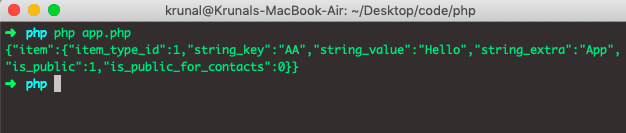
To convert the multi-dimensional array into json in PHP, use the json_encode() function. Let’s see an example where we can encode the multidimensional array.
<?php

// app.php

$post_data = array(
  'item' => array(
    'item_type_id' => 1,
    'string_key' => 'AA',
    'string_value' => 'Hello',
    'string_extra' => 'App',
    'is_public' => 1,
   'is_public_for_contacts' => 0
  )
);

echo json_encode($post_data)."\n";
The output of the above code is the following.
Generally, you have to use the json_encode() function when sending an AJAX request to the server because JSON data is useful for transferring between client and server.
So converting PHP to JSON and JavaScript to JSON is easy. That is why the JSON object contributes a significant role in today’s web development.
The reverse process of json_encode is json_decode().
Decoding JSON data is as simple as encoding it. You can use a PHP json_decode() function to convert a JSON-encoded string into the appropriate PHP data type.
That’s it for this tutorial.
Exemple Page HTML – https://www.w3schools.com/php/phptryit.asp?filename=tryphp_compiler
<!DOCTYPE html>
<html>
<?Php header('Content-Type: application/json'); ?>
<body>

<h1>Converting Array to JSON PHP: How to use PHP - By Kleber Gracia Soares - Galaxyz do Brasil</h1>

<?Php
$arr = array('a' => 1, 'b' => 2, 'c' => 3, 'd' => 4, 'e' => 5);
var_dump($arr);
echo('<br/><br/>');
echo json_encode($arr)."\n";

?>
</body>
</html>
Fonte: https://appdividend.com/